Clientes WoW 1.12.1
Clientes de jogo
O cliente Vanilla WoW 1.12.1, pronto para jogar. Três builds pré-configurados, cada um um zip simples com o reino já ajustado — sem conta Blizzard, sem Battle.net, sem patcher. Não é um download oficial da Blizzard: 1.12.1 foi o último patch de Vanilla, e a Blizzard não o distribui desde que o Classic o substituiu em 2019. Esta é a cópia própria e verificada da comunidade de servidores privados.
Não tem certeza se é a versão certa? Depois de iniciar, o canto inferior direito da tela de login deve mostrar 1.12.1 (5875).
Clientes clássicos, hospedados aqui. Cada um é um zip simples: descompacte e execute. Você administra um reino 1.12 e quer o seu na prateleira? Escreva para o taverneiro em [email protected].
Duas formas de jogar. O cliente clássico é o padrão. O cliente moderno alcança o mesmo reino pelo HermesProxy. A página de addons mostra o que instalar depois. Addons.
O cliente moderno faz uma coisa diferente: ele traz os próprios dados de itens. Num reino que está numa etapa de conteúdo anterior, uma dica pode então mostrar um preço, uma qualidade ou uma regra de vínculo posteriores aos que o reino realmente usa — uma Varinha Mágica Maior marca 15p 35c e vende por 4p 65c. O reino está certo, a dica é que é mais nova. Afeta 372 itens no preço, 316 na qualidade e 187 no vínculo.
| Baixar | Stonetavern · CinematicHD textures on the Classic client. Nothing to configure. | Stonetavern · EnhancedThe realm client. Combat that answers when you press the button. Recomendada | Stonetavern · ClassicThe plain client. Engine fixes only, nothing that touches combat. |
|---|---|---|---|
| Roda em | Windows · Linux | Windows · Linux | Windows · Linux |
| O que muda | Texturas HD, addons pré-instalados | Duas correções de engine para o combate | Nenhuma mudança além das correções de engine |
| Tamanho | 5.23 GB | 4.96 GB | 4.96 GB |
| Build | 3.0.0 | 1.4 | 1.8 |
| Lançado | 2026-07-26 | 2026-09-05 | 2026-09-23 |
| Addons pré-instalados | Incluído | Não incluído | Não incluído |
| SHA-256 | fa65adaf … 8d6b | a9f2f4b3 … 7721 | 0ebb9b5f … 79fc |
| Baixar | Baixar Cinematic | Baixar Enhanced | Baixar Classic |
Como instalar
- BaixarBaixe o zip da edição escolhida.
- DescompactarDescompacte onde você quiser.
- ExecutarExecute launch.bat no Windows, ou launch.sh no Linux.
Stonetavern · Cinematic
Detalhes
- Reino
- play.stonetavern.app
- WoW
- 1.12.1
- Build
- 3.0.0
- Lançado
- 2026-07-26
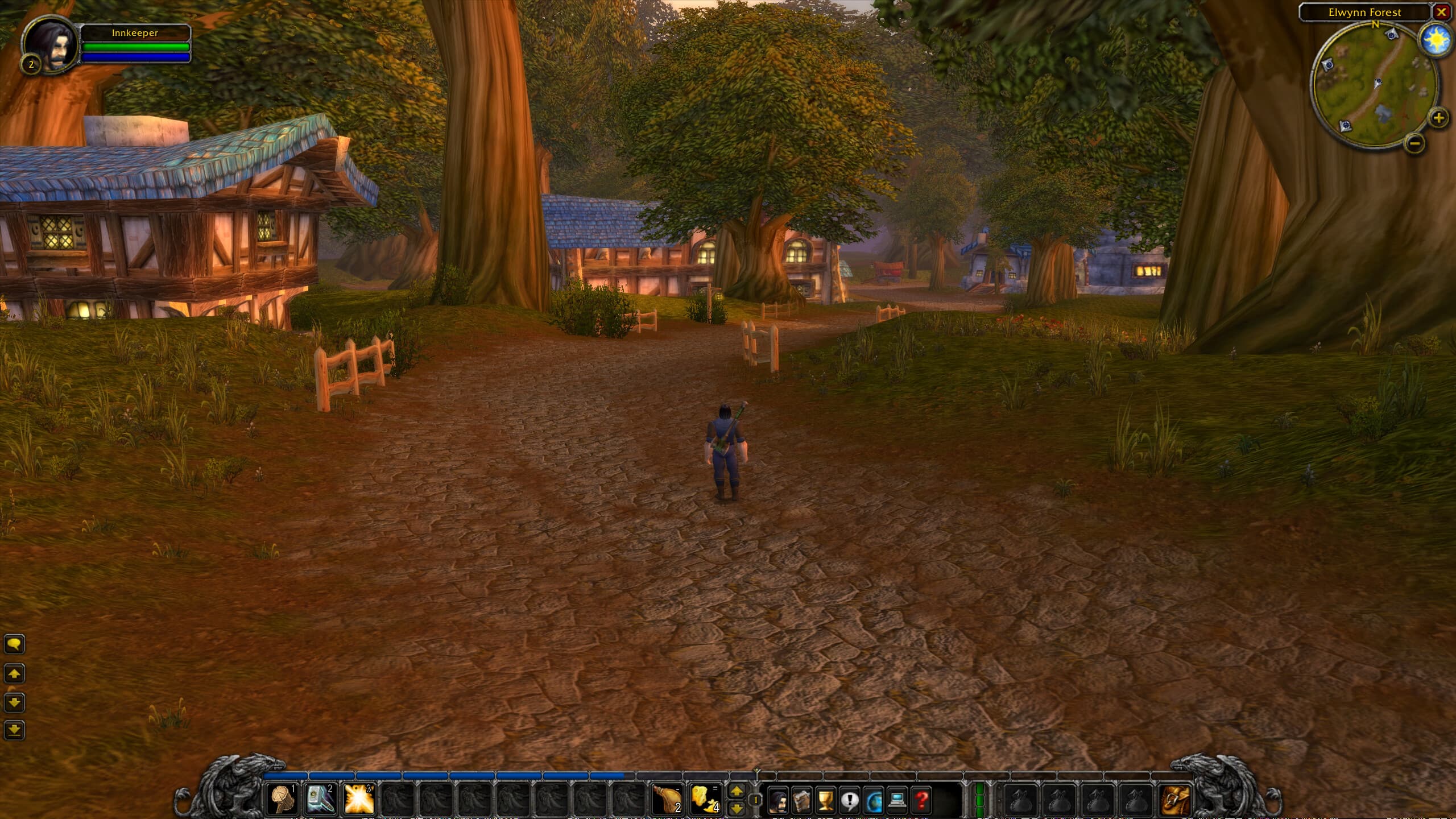
The Classic client with HD world, ground and dungeon textures, plus Questie and the Stonetavern addon already in place. Character and creature models stay pure vanilla. No graphics wrapper: the picture settings are the ones the client has built in, so nothing sits between the game and your graphics card.
HD environment textures, characters and creatures untouched. Questie and the Stonetavern addon preloaded. The starter reads your monitor resolution before every launch, on Windows and on Linux. Windows: unzip and run launch.bat. Linux/Wine: run launch.sh, which places the bundled DXVK next to the executable. On Linux it also checks three things that otherwise fail without any message: whether wine has a sound module in the directory it really loads from, whether your processor supports AVX2, and whether a Vulkan driver is installed. If one is missing you get a single line with the install command for your distribution, and the starter falls back to something that still runs instead of stopping.
Mudanças
- 3.0.02026-07-26
- Rebuilt on the current Classic base from 2026-07-23. The previous build was from 2026-06-07 and had none of the fixes made since.
- The starter now reads your monitor resolution before every launch, on Windows and on Linux. Without that the client can cut off the bottom row of the picture, including the Quit button and the version line, when your monitor is larger than the value stored in the config.
- Removed ReShade. The color grade and the four grade presets are gone with it. Reasons: a wrapper between the game and the graphics card is the most common source of launch problems that are hard to trace, it collides with DXVK on Linux because both want to be called d3d9.dll, and it costs frame rate on weaker machines.
- Fixed the Terms of Use screen. The previous build shipped with the terms marked as already read, so no player ever saw them.
- Questie and the Stonetavern addon stay preloaded, same as before.
- New: a small addon applies the shipped picture preset once per character. Vanilla 1.12 has no menu control for shadows, grass density or the extended view distance, and pressing Okay in Video Options wipes exactly those values. Type /stvideo max to put them back, or /stvideo status to see what is currently set.
- 2.0.12026-06-07
- Removed the pfQuest and Bagnon addons. Questie already covers quests, and the extra bag addon was redundant. Lighter, cleaner addon set out of the box.
- 2.02026-06-06
- Big update. HD world and water textures baked in: ground, rock, buildings and water at higher resolution. Creatures and characters stay 100% vanilla (no model swaps, at most sharper textures).
- Grade reworked to a single clean color LUT. Dropped the bloom, sharpen and vibrance passes that muddied the image. Four grades you can flip between in-game with Page Down / Page Up: epic-warm (default), teal-orange, vivid and moody. Pos1 (Home) still toggles the grade off for plain vanilla colors.
- Questie and Bagnon now preloaded alongside the Stonetavern addon, so there is nothing to install after unzip.
- Confirmed widescreen FoV and maxed view distance. Clean build, no account data shipped.
- 1.0.42026-05-30
- Toned the grade down to just the cinematic color LUT. The bloom, sharpen and vibrance passes were too heavy and washed the scene out. Now it is a clean color pass that stays close to vanilla. Press Pos1 (Home) to toggle it off.
- Also fixed the ReShade "errors loading some effects" message on launch (a couple of bundled textures were missing).
- 1.0.22026-05-29
- Quality-of-life tweaks now baked into the client: widescreen FoV, 64 sound channels (raids sound right), bigger nameplate range, further view + grass distance, more camera zoom, auto-loot (hold Shift for the loot window), Large-Address-Aware (fewer crashes) and a camera-shake fix.
- 1.0.12026-05-29
- Fix: the cinematic grade now actually applies on Windows. The client is pinned to Direct3D 9 so the bundled ReShade loads, and the preset path was corrected. The first build shipped with OpenGL forced, which silently disabled ReShade.
- First-launch EULA and Terms-of-Use prompts stay pre-accepted, so there is no popup on first run.
- Press Pos1 (Home) in-game to open ReShade and toggle the grade on/off.
- 1.02026-05-28
- First Cinematic build. Warm grade tuned against an Alienware QHD sRGB reference monitor.
- ReShade 6.7.3 with SMAA (clean edges), Bloom (torches, stained glass, sun), LumaSharpen 0.3, Vibrance 0.15, Cinematic LUT at 0.85.
- Press Pos1 (Home) in-game to disable the grade and see vanilla colors at any time.
- ReShade splash banner suppressed, so players see only the game.
Verificar
sha256 · fa65adaf136c08137ff20c34ea5442d3d7f72e5718c4ab83654cdd19ddaf8d6b
Stonetavern · Enhanced
Detalhes
- Reino
- play.stonetavern.app
- WoW
- 1.12.1
- Build
- 1.4
- Lançado
- 2026-09-05
Everything in the Classic build, plus two fixes for the parts of Vanilla combat that were never the design and always the engine. nampower removes the delay the client adds before a spell is sent, so casts land when you press the key. UnitXP SP3 makes range and line of sight match what the server computes, so a spell that says it is in range is in range. Nothing about the world, the loot or the numbers changes.
Windows needs the Microsoft Visual C++ 2015 to 2022 x86 runtime for nampower. Most machines already have it. If the game closes at once without a message, install it and try again. Large download, resumable. Your browser can pause and continue.
Mudanças
- 1.42026-09-05
- Your video settings now survive a restart. The starter used to write the monitor resolution and refresh rate into Config.wtf on every launch, which threw away whatever you had picked in the game.
- No more black screen after switching the window mode. On a scaled Windows desktop the old starter read a resolution no monitor has; in fullscreen that mode cannot be set. The starter now reads the real mode of every attached monitor and only steps in when a stored value cannot work.
- The refresh rate is read from the display mode itself, not from a driver field that often says 60 or 1.
- Config.wtf keeps its encoding and line endings. The old starter turned non-ASCII characters into question marks.
- launch.bat stops with a message when the display step fails instead of starting on a half-written config, and it honours the REALMLIST variable the launcher passes.
- Multisampling default set to 4x, the value the package notes always intended. 8x was a leftover from the build machine.
- 1.32026-07-23
- Built from the same rebuilt Classic base as the plain client, on the original Blizzard WoW.exe.
- nampower: the client no longer holds a spell back before sending it, which is what made Vanilla casting feel a beat late.
- UnitXP SP3: range and line of sight are computed the way the server does it, with the matching in-game addon for its settings.
- Windows needs the Visual C++ 2015 to 2022 x86 runtime for nampower.
Verificar
sha256 · a9f2f4b3bcdd5c53b8ba4b44af97195443f960b17aff7318264f8d99a83d7721
Stonetavern · Classic
Detalhes
- Reino
- play.stonetavern.app
- WoW
- 1.12.1
- Build
- 1.8
- Lançado
- 2026-09-23
The same base as Enhanced without nampower and UnitXP SP3, for anyone who wants Vanilla exactly as it behaved, with the original field of view. Realmlist already pointing at play.stonetavern.app. The launcher installs and patches it for you; this ZIP is the same client for a manual install.
Large download, resumable. Your browser can pause and continue. Verify with sha256 if you like.
Mudanças
- 1.82026-09-23
- The terms shown on first start now match the house rules: several accounts are fine, but only one character at a time out in the world.
- They also state the minimum age of 16 and link the Terms of Service and the Privacy Policy on the website.
- 1.72026-09-23
- Field of view back to the original 90 degrees. The widescreen value made the world look wider than it ever was in 2006.
- The launcher now installs and patches this client. Later updates download only what changed instead of the whole game again.
- Linux: START.sh fetches a pinned GE-Proton and runs the game with it. No Steam needed, and a system update cannot break it.
- Windows: launch.bat uses the realm the launcher picked and stops with a message if the display step fails.
- Windows: the display step reads the real resolution and refresh rate of your monitor and keeps what you chose in the game.
- The game cache is cleared on every start, so old item and quest data from another server cannot show up.
- 1.32026-07-23
- Rebuilt from the original Blizzard WoW.exe. The previous repack turned out to be pre-patched, which is not what a clean Classic client should be.
- VanillaFixes 1.5.3, vanilla-tweaks 1.6.0 and wow_turbo 1.2.0: engine and performance fixes only, no gameplay change.
- Picture and cinematic preset applied as plain client settings, so nothing sits between the game and your graphics card.
- Reads your monitor resolution before every launch, on Windows and on Linux, with no refresh-rate cap.
- Windowed mode that survives alt-tab.
- Stonetavern terms shown on first start.
- 1.22026-05-29
- Invisible client fixes added, still pure vanilla and no gameplay change: 64 sound channels (raids sound right), sound keeps playing when alt-tabbed, Large-Address-Aware (fewer crashes), camera-shake fix. First-launch Terms prompt pre-accepted.
- 1.12026-05-22
- Clean rebuild, with no leftover account data, saved variables, or addons. Fresh out of the box.
- Login screen and in-game help links now point to stonetavern.app (no Blizzard or WoW-Europe URLs).
- Terms of Use shown on first launch.
- 1.02026-05-20
- Initial Stonetavern build on top of Vanilla 1.12.1.
- realmlist.wtf preset to play.stonetavern.app.
- Plain zip. No installer, no patcher, no telemetry.
Verificar
sha256 · 0ebb9b5f0386d547e0715fdae57955743dd06e991b507ca5a7729d14af0479fc
Prefere o cliente moderno 1.14.2? Ele está pronto para jogar e fica no nosso Discord.
Abrir o DiscordPerguntas frequentes
- É o cliente 1.12.1 de verdade?
- Sim. Build 5875, o cliente 1.12.1 no qual os servidores privados de Vanilla se padronizaram. Não é vendido em lugar nenhum, oficial ou não — todo cliente de servidor privado em circulação, o nosso incluído, é a cópia preservada pela comunidade.
- O download é seguro?
- Sim. Cada cliente é um zip simples — sem instalador, sem proteção contra cópia, nada que rastreie você. Os hashes SHA-256 ficam na barra Verificar de cada card, para conferir antes de descompactar.
- Preciso de uma conta Battle.net ou Blizzard?
- Não. O Stonetavern roda totalmente separado do Battle.net — nunca fala com os servidores da Blizzard nem vê uma conta retail. Descompacte, execute, e você está no nosso reino, não no deles.
- Cinematic, Enhanced ou Classic — qual escolher?
- Cinematic adiciona texturas HD ao mundo e às masmorras, personagens e criaturas continuam vanilla. Enhanced corrige duas peculiaridades antigas do engine para o combate responder assim que você aperta a tecla. Classic é o build simples: os mesmos ajustes de engine, nada mais tocado. Os três se conectam ao mesmo reino.
- Funciona no Mac ou Linux?
- Linux, sim — cada build traz o launch.sh com DXVK incluído. Mac, não: o cliente de 32 bits não tem um caminho funcional na camada de tradução gratuita da Apple, e não fingimos o contrário.